Micro logs #01: Dry run with pacman package manager
Dry run with pacman package manager
Source: https://wiki.archlinux.org/title/Pacman
pacman: Package manager for Arch Linux
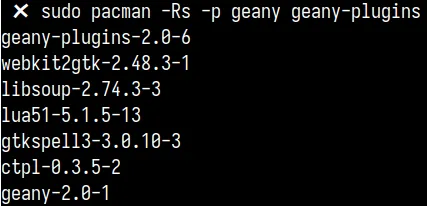
-p flag can be used with pacman to dry run commands — that is, see what your command is going to do before it actually does anything.
Might not work with certain flag combinations like -n, and it will simply throw an error.
Flags used in the command -
R:--remove- removes the specified package.s:--recursive- removes the package and its dependencies that are no longer required by any other installed package.n:--nosave- removes the package’s configuration files as well.
Optional explanation with simple examples -
pacman -Rns : To remove a package and its dependencies, along with the package’s config files which are not required by any other installed package.
1. Normal Behavior -

2. -p flag works well and shows a list of the final packages which will be removed. It only shows what Pacman -Rs is going to do instead of asking for deletion confirmation to proceed further. -
3. -p doesn’t work when used with -n flag -

Hope you like it.
🦖